 From 20 years of call-centre operations — CHF 150 one-time, no subscription
Where does it sound bad —
and whose fault is it?
Sniffony does not come from a lab. It is the tool I wished I had in twenty years of call-centre operations: open a capture, and within seconds you see which provider, which network and which call is the problem — packet loss, jitter, bursts, rejected calls. No Wireshark, no cloud, everything stays in your network.
Built by someone who knows the calls
I am Markus Tausendfreund. For six years I was the system administrator of a call centre — where the agents sit and the phone never stops ringing. For fourteen years now I have been running the platform of a call-centre software vendor as a cloud system administrator.
All those years the same question kept coming back: is it us, the provider, or the network in between? The answer is almost always in the capture — you just have to find it fast enough. That is what Sniffony is for.
Phone system, agent seats, trunks — and the question “why can’t the customer hear me?”
A platform for call-centre software: many customers, many providers, SIP around the clock.
Sentences every admin knows — and how Sniffony answers them
The customer can’t hear the agent.
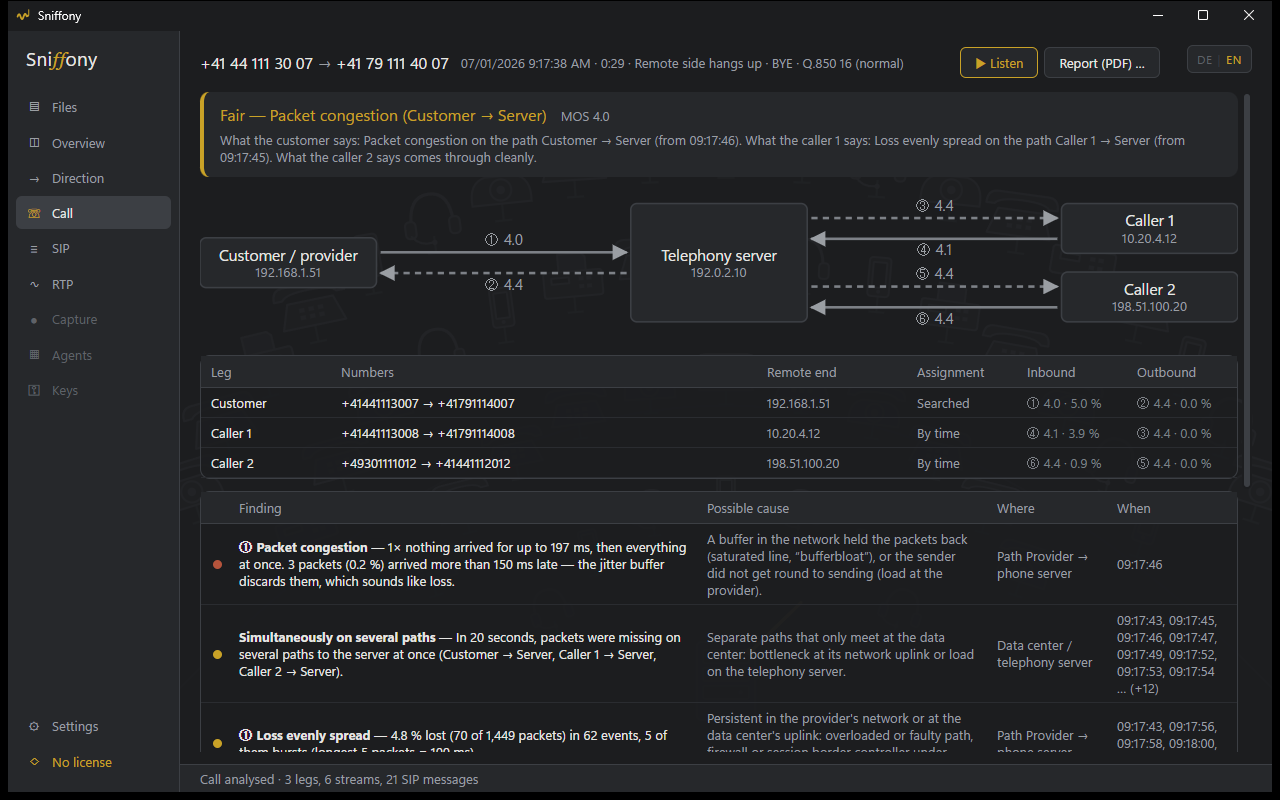
One call with all its legs — customer and agent together, one-way audio and silence as findings.
It’s been crackling since this morning. For everyone?
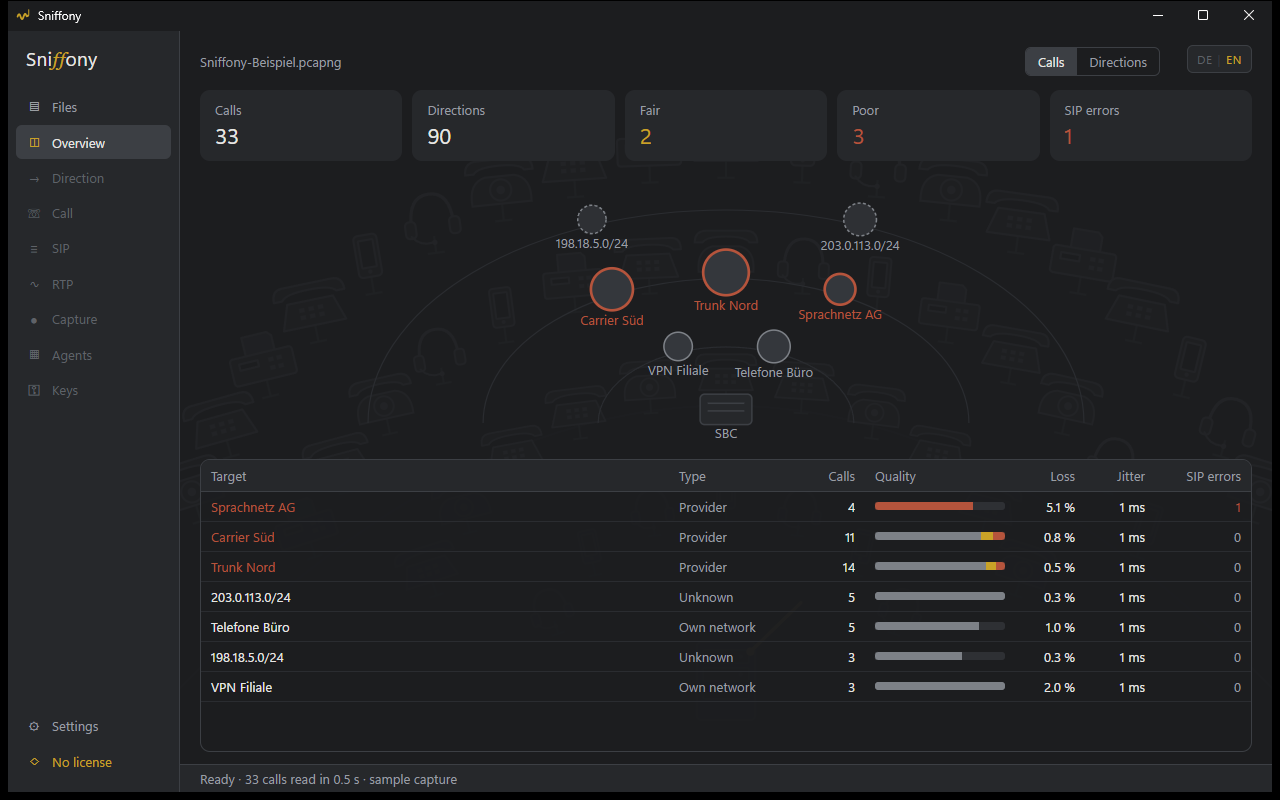
The overview per provider and network, quality over time with the dip.
The carrier says everything is green.
The finding with where and when as a PDF report — for the ticket with your provider.
Since TLS we can’t see anything.
Store the key log, and SIP and audio are readable again.
Calls keep dropping.
408, 488, 503 kept apart from “busy” — is it the trunk saying no, or the person called?
Here are 40 files from the ring buffer.
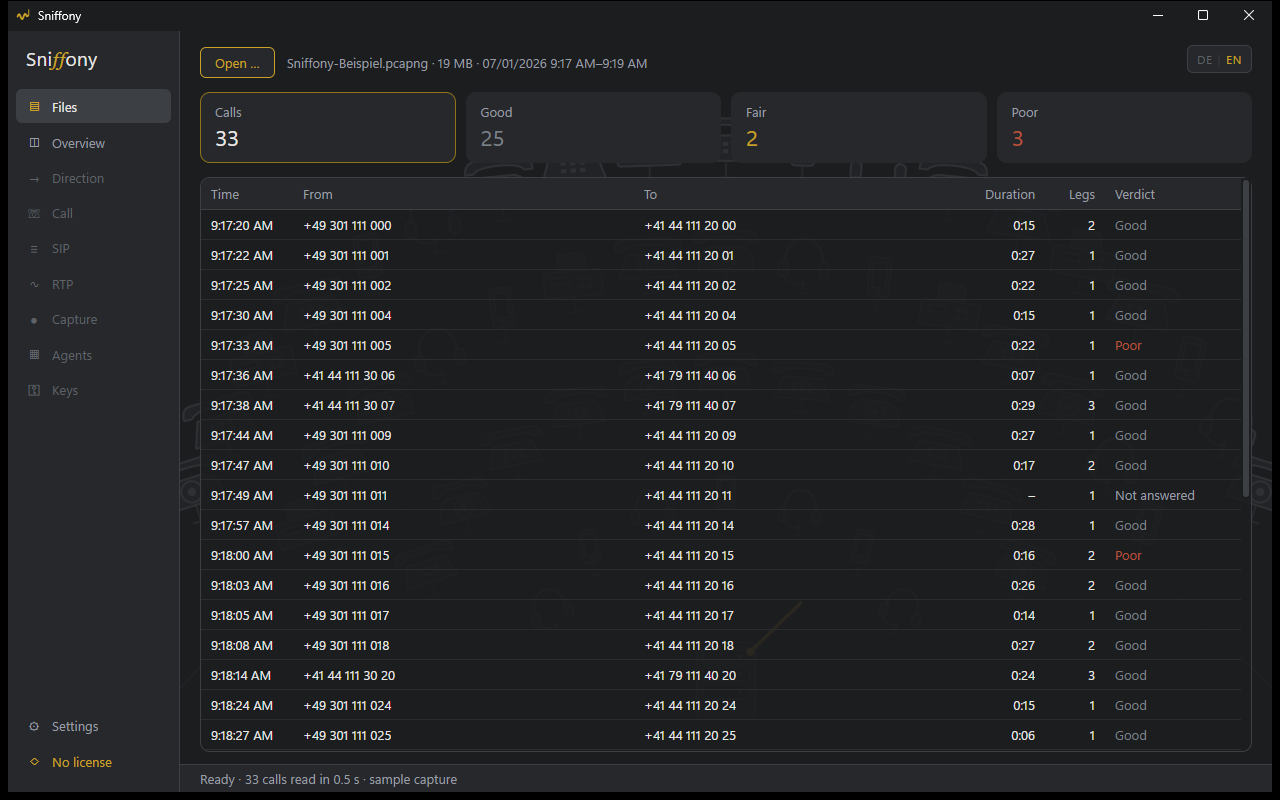
Open them all at once — calls across file boundaries.
What Sniffony does
For call centres, contact-centre platforms and everyone running a SIP system — Asterisk, FreeSWITCH, 3CX, Kamailio, SBCs, Teams Direct Routing — who wants to know why it crackles before the customer calls.
Open a capture, done
pcap and pcapng from Wireshark, dumpcap, tcpdump or the packet capture built into Windows (PktMon). Whole ring buffers at once.
No Wireshark needed
Sniffony reads SIP (UDP and TCP), SDP, RTP, RTCP and DNS itself — checked field by field against tshark.
A verdict for every call
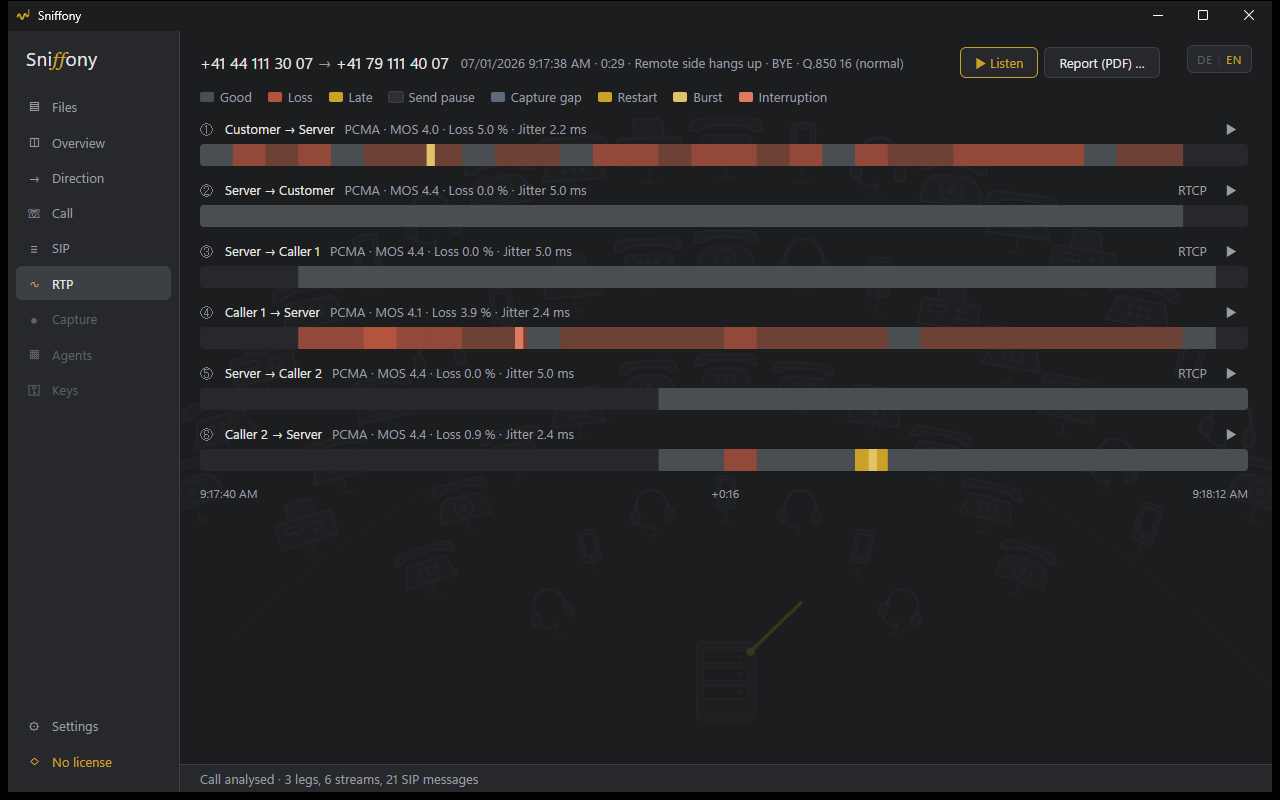
Good, fair, poor or not answered — from loss, jitter, late packets and RTCP reports. Gaps in the capture do not count as loss.
Per provider and network
Addresses are matched to providers (your own rules or RDAP); you name your own networks. The most conspicuous comes first.
SIP errors of the system
403, 408, 488, 503 … kept apart from “busy” and “declined” — so you see whether the line or the callee says no.
One click into the details
A destination in the overview shows its quality over time with its drops; a call opens with all legs, findings and possible cause.
SIP ladder and RTP timing
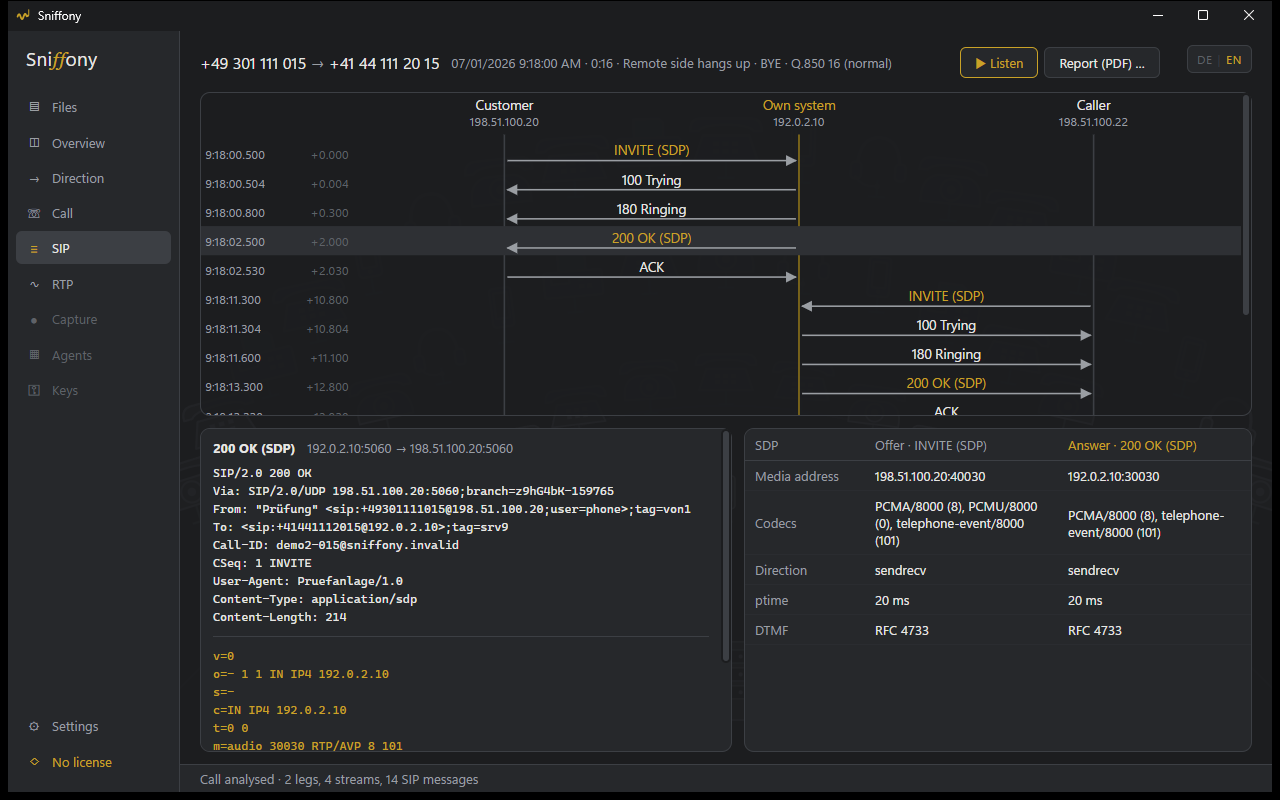
Every SIP message in full, SDP offer and answer side by side. Every direction second by second: loss, bursts, restarts, gaps in the capture.
Listen and report
Listen to the conversation in the app — customer left, other side right; G.711, G.722 and Opus included. The call as a PDF report for your provider or a ticket.
SIP over TLS and SRTP
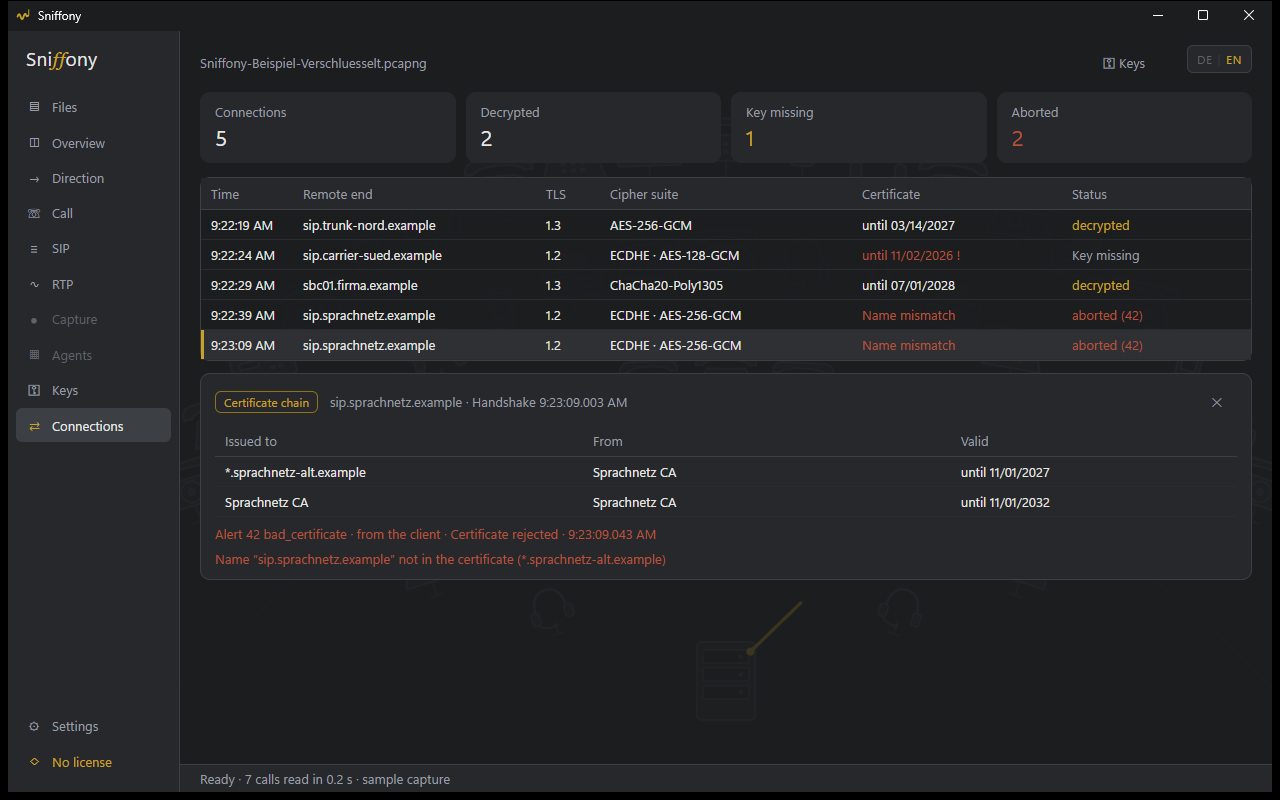
Store a key log (SSLKEYLOGFILE) or the server key once — from then on Sniffony reads TLS 1.0 to 1.3 and the SRTP audio by itself. Keys embedded in the capture work too.
Certificates and handshake errors
Every TLS connection with version, cipher suite and certificate chain — expired certificates, wrong names and alerts such as 42 bad_certificate, even without any keys.
Scheduled recording
A Windows service records by job — continuously, weekdays from–to, or “one hour, now”. SIP only, SIP with RTP headers, or full with audio; split by size and time, oldest files go first. Via an existing Wireshark (dumpcap) or the capture built into Windows (PktMon).
Your own numbers
Hotline, switchboard, campaign number: enter them once with a name (ranges and prefixes too, or as CSV from your phone system) — the names then appear in the list and the report, the overview shows quality per number, and the search finds “Hotline”.
WebRTC and browser phones
Sniffony detects WebRTC in captures (ICE, DTLS, TURN) and measures Opus correctly — even with no SIP at all and through a TURN relay. SIP over WebSocket is read. With a key log from Firefox or the media server you can listen to the audio (DTLS-SRTP). Chrome's statistics from chrome://webrtc-internals open just like a capture — or “Sniffony for Chrome” records every call in the browser phone by itself, including SIP messages and numbers, without audio. These calls get a SIP ladder, a second-by-second timeline and findings with causes — and joined with the server capture, customer and extension appear in one view.
Workstations without manual work
A workstation installer (or the setup, silently via Group Policy) sets up “Sniffony for Chrome”; the workstation registers with your server using a collection code and sends every call there by itself — from home office too, without an open port. Your PC fetches them from there. The “Agents” page shows every machine with version, status and today's calls.
Pair servers, fetch recordings
The recording service also runs on your SIP servers. Paired once with a code, you create jobs there just as on your own PC — and your PC fetches the finished sections: encrypted, with checksum, with a bandwidth limit and time window, resuming where it stopped after an interruption.
Set up servers and keep them current
The setup has a “Recording only” role for servers — also silently deployable, with the pairing code as a parameter. Your PC sends new versions to the servers itself and installs them as soon as nothing is recording there; if one does not start, the old one keeps running.
English and German
Switch at the top right, instantly. The installer asks, too.
No cloud, no account
Captures never leave your network — those from paired servers go straight to your PC. Offline license, updates via a button in the app.
What it looks like
A sample capture with artificial calls comes with it — try everything before you buy.
Coming next
Sniffony grows in stages. With a license you get every update through the button in the app.
Linux servers
The recording service for Debian too, with the same pairing.
Try first, then buy
Without a license Sniffony shows every feature on the included sample capture. Opening your own captures and recording require a license. No trial period, no counter.
After purchase your license file arrives by e-mail. Load it once under ⚙ Settings → License, done. It is permanent and works without internet.
Windows 10/11 (64-bit). Version 0.14.0 · Installer 82.6 MB · SHA-256 B6CF1BE8…711DE614
Payment is handled by Polar, which acts as the seller of record and takes care of VAT.
How to install
- Download: “Download installer”. If the browser says the file is rarely downloaded, choose Keep in the download menu “…”.
- Start: double-click
Sniffony-Setup.exe. If Windows shows “Windows protected your PC” with only “Don’t run”: click More info, then Run anyway appears. - Install: choose the language, “Next”, optionally tick desktop icon and “Open captures with Sniffony”. No administrator rights needed.
- First start: “Open sample capture” shows everything Sniffony can do.
- License: after purchase, load the license file from the e-mail under ⚙ Settings → License.
To check that the file is unchanged, run Get-FileHash .\Sniffony-Setup.exe in PowerShell — the result must match the
checksum. Later versions arrive via a button in the app.
No account, no data collection
No sign-in, no license server. Captures and results stay on your computers, in your network.
Wireshark? Welcome, not required
If it is installed, Sniffony uses its codecs too. It is not needed.